
01
Get started
WayVibe is free on Android and made for adults making real plans.
- Install the app. WayVibe is on Android, through Google Play.
- Confirm your date of birth. You must be 18 or over. Accounts under 18 aren’t allowed.
- Add a profile photo. You need one before you can post.
- Bring your people. Send an invite link to your friends and keep them in squads: college, work, the cricket lot.
- Make a plan, or join one. That is the whole point. The rest of this guide shows how.
02
Ask where they are
One friend, one question, and a photo back.
- Pick one friend and tap Where are you? That is the whole ask.
- They reply with a photo taken right then, inside the app, so you see where they actually are.
- Turn it into a plan. If it looks good, send a plan card and head over.
03
Make a plan
Chai at 8? Box cricket on Sunday? Set it once and let it sort itself out.
- Start from the tab bar. Create a plan from there, or tap into a plan card someone else has made.
- Pick a real date and time with the date and time pickers, and choose who sees it.
- Send it to your squad. Once enough of them are in, the plan locks and its chat opens on its own, so nobody has to chase.
- Sort the details with RSVPs and polls in the plan chat.
- Afterwards, WayVibe asks if you made it.
04
Moments
Photos taken in the app, shared only with the people you choose.
- Open Moments to see your friends’ Moments as a grid.
- Tap one and swipe through them like reels.
- Only the last 24 hours show up, so it is always what is happening now.
- Want to keep one? Tap Save.
05
Chat, stickers and GIFs
One-to-one and group chats where the plan and the talk about it live together.
- Drop a plan card or a poll into any chat.
- Open the sticker and GIF tray to reply. It now has 176 new regional stickers in Gujarati, Hindi, Punjabi and Rajasthani.
- React to messages, mute a noisy group, or turn on disappearing messages.
- Tidy up in one go. Select several chats and act on all of them at once.
06
The map and Nearby
See what is on around you: chai runs, box cricket, long drives.
- Open the map to find plans and places near you. Pick your city when you are somewhere new.
- Tap the chip on the map to see who is nearby.
- Drag the range slider to set how far out to look.
- Use Search to find people and places, browse the Places screen, and swipe to add a friend.
07
Your profile map
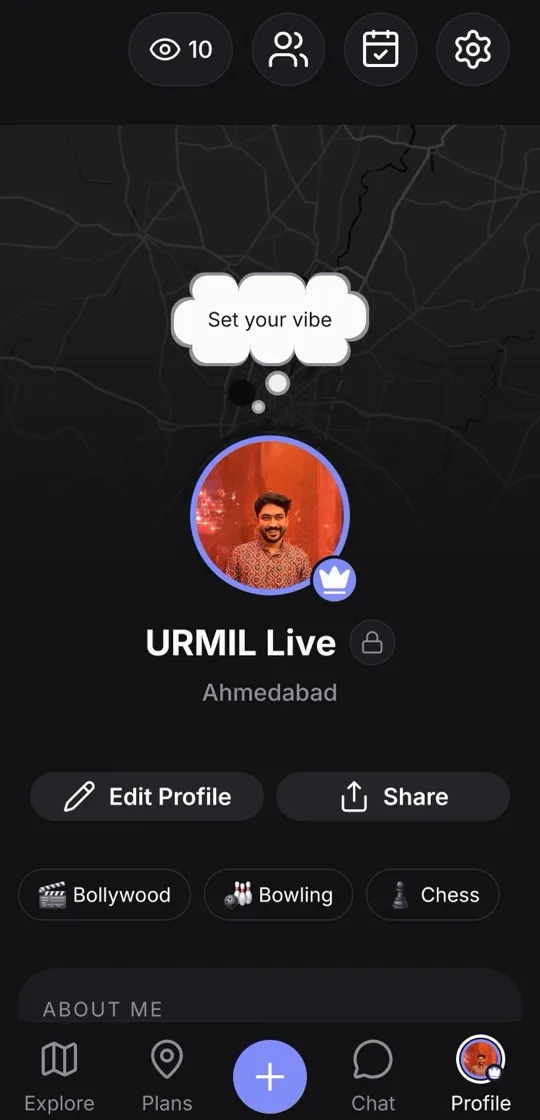
Your profile banner is a map of the places you’ve been.
- Open your profile. The banner at the top is a map of the places you’ve been.
- Below it is a history of what you actually did.
08
Location and Ghost Mode
You decide when WayVibe sees your location.
- Location only when you choose. WayVibe asks for it when you share it with a plan, post a public plan or open the map.
- Public plans show the area, not your address.
- Turn on Ghost Mode to hide from the map.
- Leaving? You can delete your account and data from inside the app, or follow the steps on Account & data deletion.
09
Report, block and Safety
If something feels off, deal with it right where it happens.
- Report or block from a profile. Open their profile and choose Report or Block. You can also report a message or a plan.
- In a chat, tap the shield in the chat header. It opens the Safety sheet for that conversation.
- Meeting someone new? Read our safety tips first.
10
Help and policies
Questions? Radhaarc AI Labs
support@wayvibe.app +91 63546 34577WayVibe is published by Radhaarc AI Labs, India. Write or call us about anything in this guide.